Sunday, 20 January 2013

Heat dissipation -- braking power

It is common knowledge that no cars run without brakes. The faster the car, the more powerful the brakes. Fast road cars need large brake discs and calipers to gain more friction to stop early and avoid danger. Racing cars may employ carbon fibre discs and rougher brake pads on top of that, in order to gain better control of the car and shave seconds off lap time. Powerful brakes harness fast cars, that is always a rule for auto manufacturers, drivers and auto tuners. It should increase linearly with engine output.


A Porsche 911 GT2 (997 generation)


Ventilated carbon ceramic disc and 6-piston monobloc aluminum calipers on the 911 GT2

  Heat dissipation for PCs is quite the same. Quad core processors and high-end discrete graphics cards are like turbo charged V8s. They bring performance to an amazingly fast level, but heat is a by-product that pose potential danger when not removed. An ancient Chinese poet once said something that can be roughly translated into," the higher in altitude one gets, the harder for him to withstand the cold temperature of the surroundings". To go fast is just phase one of a high performance experience, unless one plans to finish himself once and for all. Auto manufacturers have put in great efforts to ensure braking power is adequate for each car they build. Nobody can bear the consequences of getting a customer killed these days. However, when it comes to laptops, it is different. The owner can hardly get himself injured if his machine explodes. The worst scenario is merely some malfunctioning parts or a broken computer. Heat dissipation is thus generally overlooked by some manufacturers.
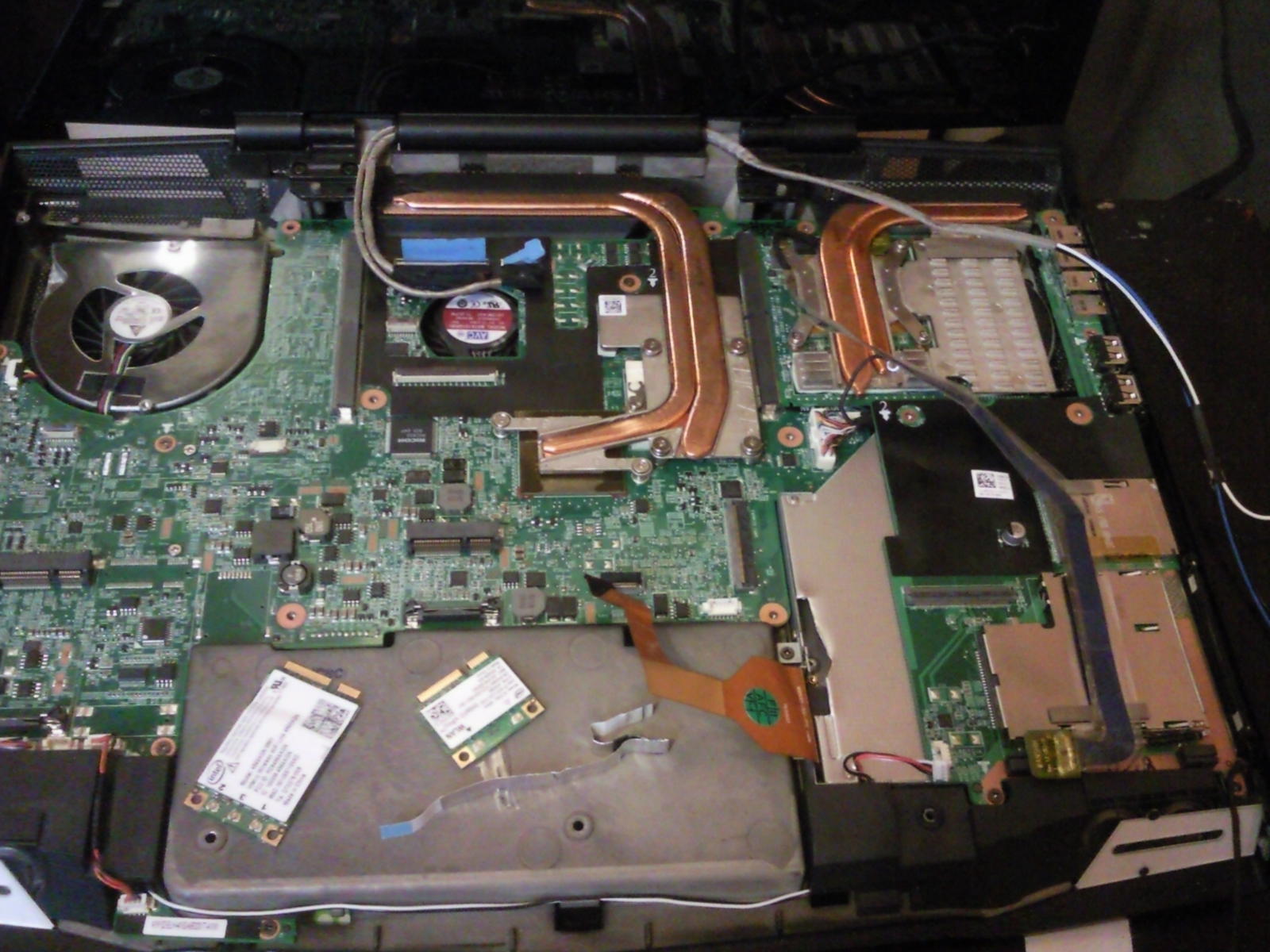

Cooling system on a modded Alienware M17x R2. Dual fans, copper heat pipes with carefully optimized airflow, a good model of efficient laptop cooling.
(Original image posted by AssimilatorX on overclock.net)


Poor cooling can be a real headache for laptop users.


  Those who frequently travel and hate bulky luggage want ultraportables. Their feather-light weight and compact size enable the owners to "go anywhere, do anything". Usually armed with a 11.6", or 13.3" display, dual core processor and integrated graphics, relatively little heat is generated. Those who regularly travel on business are often seen with a Lenovo Thinkpad or a Dell Latitude, as they look for business-friendly features, stable system and tough build. Those serious gamers arm themselves with powerful discrete graphics cards, quad-core processors and, probably, faster than hell SSDs. Other types of users also exist, to name but a few. It is not hard to tell that users hardly put heat dissipation as the key factor to consider when purchasing notebook PCs. It is also obvious that almost no customers decide their buy solely based on cooling performance. Manufacturers do their best to meet consumers' demands, and when demand is not high on certain aspects, they respond by paying less attention to such aspects.

  As heat from electronic devices cannot be fully eliminated. We can take some solid actions that help prevent our devices from overheating, and the effect is so much greater than simply pushing the manufacturers, asking for more powerful cooling performance. Here are some tips below.

  1. Remove objects that block the vents.


  Vents can be found at the back or on the sides of laptops. It is proven that the temperature of PCs, no matter notebooks or desktops, rise significantly when their vents are blocked by things such as books, boxes or desktop stationery. Place these objects farther away from the vents to ensure smooth airflow into and out from the vents.

  2. Avoid usage on beds.


  Generally, notebook PCs, when used on beds, are considerably hotter than those used on proper desks. Avoid using them on beds. The damage of a burnt hole in the sheet is so minimal compared to a fried CPU or graphics card. If you have to, buy a laptop stand that is specifically designed for notebook usage on beds.

  3. Regularly check the vents and fans.


Dusty CPU and PSU fans in a desktop chassis

  If your notebook has already been used for some time, it is a good habit for you if you can check the status of the vents of the fans regularly, i.e. once three months. These parts trap dust and other particles in air very easily, resulting in blocked paths of airflow and slow-revving fans. Clear these parts carefully with a piece of fine cloth and a couple of cotton buds.

  4. Last but not least, buy a cooling pad, if necessary.

A Cooler Master Notepal X3 cooling pad

  Laptops are designed for portability. Their purpose makes buying a heavy cooling pad a bit meaningless. If your laptop is overheating hard, and you already have in mind the right kind of cooling pad to buy, you can get one, for the sake of system stability. Do check the working mechanism and build quality of the cooling pad, too, because you do not want it too break too easily, or to end up blowing hot air back into the vents when they have already been sent out by the fans inside the laptop.

  I wish by publishing this post more people can be brought into attention to the heat dissipation of their electronic devices, especially their laptops. This is for the well-being and lifespan of our dear working and playing mates. Only when they have been treated nicely and carefully, they can bring us maximum efficiency and user experience. Being good to them is also being good to ourselves.


Wednesday, 21 November 2012

My last Rabook laptop

Rabook may not be a brand that many laptop buyers are familiar with. It's a Chinese company that sold performance desktop replacements when it was founded a few years back and has now expanded its business to desktops and portable workstations. It shares similarities with brands that use Clevo systems as bases for their products, which, as far as I know, include Sager, MSI, Pcspecialist in the UK, Terransforce in China, Aftershock in Singapore, and many more. Unlike ASUS ROG ( Republic of Gamers), Alienware and Samsung Series 7 Gamer which develop high performance systems on their own, using pre-built systems from Clevo greatly reduces development costs, as well as the number of talented designers required. Therefore some cons are pretty obvious : the quality of final products heavily depends on the pre-built systems, and customizable features such as LED lights and backlit keyboards are somewhat lacking. Service and warranty depend on each individual company instead of Clevo. In my case, Rabook offers one year of  repair and technical support by default.

Rabook Icebat I79X

HOW MY DECISION WAS MADE
Rabook is quite a small brand in terms of sales. Shops with display sets can only be found in major cities like Beijing and Shanghai, where the delivery begins if one buys from an online shopping platform, Taobao. I was attractted by the amazing price of the 17" model the brand offered, which was only a fraction of similar gaming rigs offered by ASUS and Alienware, namely the G73 and M17 R2 with the first generation of Intel Core i7 processors if I remembered correctly. Anyway, it was October 2010 and I had a rather urgent need for a laptop. Unable to resist the tempting price, I ordered a 17.3" set that belonged to the Icebat series. It was then the chronic headache started.

SLOW WEBSITE UPDATE OR EAGER SALESMAN?
Specifications of the model I ordered were Core i7-720QM, ATI Radeon HD 5870M, 4GB DDR3 1333, 2×500GB 7200rpm HDD in RAID0, 17.3" FHD LED. However, when I called their outlet in Beijing, I was informed that they have run out of stock on this model which was priced at around RMB 15000 (SGD 3000; USD 2150). Instead, they zealously recommended this substitute called the Icebat X79, which sported a Nvidia GeForce GTX 480M 2GB GDDR5 card and slightly higher clocked i7-740QM CPU in exactly the same chassis and motherboard. This model was priced at RMB 20000 (SGD 4000, USD 2900). Though equipped with a flagship card and slightly faster CPU, with a price tag one third more expensive, the performance was much less than one third better. I hesitated. By then I had made many mistakes already, if only I knew so. First was the quick decision made without advance research on views and comments of the brand. Second, pictures on the website were produced mostly using photoshop. Unless real life photos in HD resolution were seen, one simply could not tell how it looked like. This is common for most electronic products, I guess. Third, I should have sat down to consider whether to invest on the more expensive model, for its value for money was a lot lower. Anxious to own a laptop (I only had a desktop then), and bewildered by the name of a flagship card (a GTX 480M! Think of the rarity and phenomenal performance it could offer, as well as the attention received by the owner), I placed the order (ironically, it was just month later when Nvidia launched a faster card, the GTX 485M. Rarely did the model number exceed ~80 for single GPU cards).

  What was interesting, when I asked whether I could still get the HD 5870 model, I was told by the salesman that the production has ceased, and no more remain in stock. However, after one month from making my purchase, I noticed that the HD 5870 model still remained on the company website, the number in stock was still above zero, and changing with time. So, I'd say that the company had a very slow team that lagged far behind time, or a salesman so eager for his year-end bonus that he must bluff to sell this more expensive model.

INITIAL EXPERIENCE
  The delivery was quite fast, the guy on motorcycle was very polite. But those positive comments only go to the delivery company instead of the manufacturer. I couldn't help to open the package, but the overwhelming joy was soon outcasted by disappointment. Modest and low-profile it probably was, but the raw, matte black finish of the plastic chassis resonated perfectly with a 87' Nokia cell phone. The hand rest was a bit more glossy, but it lost in terms of producing reflections when competing with the Super-glossy screen. The letters on the keyboard look as if they were printed on stickers first before they were hammered to stay on the keys. It was such great value for money, as I bought a brand new, unused vintage electronic device that gave a very tough and raw feeling and was ready to withstand any abuse. It made me look like a real man. Anyway, without any more delay, I finished disk partition and installed a Windows 7 Ultimate system. Then I installed CPU-Z and GPU-Z to check if the specs were as promised, and later some games like Crysis and Farcry 2 to test how the components worked.


Left, right, and back sides


Plastic bottom

COOLING SYSTEM - ENOUGH POWERFUL?
I have read articles on the web reviewing the machine I bought. I should have learnt more than solely relying on these reviews, especially those posted by certain forums and amateur websites. Those fans and so-called "editors" had disassembled the chassis, saying that the build was "very solid" and the cooling"truly powerful". Yeah, who can ask for a more solid build than a 1980s vintage machine with exceptionally rough finish? And the conclusion of a "very powerful" cooling system was drawn simply based on how it looked when the outer chassis was removed. "Two powerful fans draw hot air from the CPU and GPU while multiple copper heat pipes direct the heat to the vents." Without measuring temperatures neither at full load nor after working long hours, the power of the cooling system seemed to be extraordinary. This "powerful" cooling was what that led to the tragedy.

SO HOT THAT IT ALMOST MELTED
About one year and seven months after the purchase, I installed Civ 5 on the laptop. After three hours running in default settings (which were mostly configured at high with some effects at medium at 1080p), I could feel the heat from the keyboard and hand rest. The air from vents was so hot that my fingers were nearly burnt by just feeling it. When I booted the notebook the next day and browsed some websites for roughly half an hour, the graphics card protested by displaying arrays of various colours. After repeating for 4,5 times, the computer automatically powered off. This repeated every time after it worked for 30 minutes or so.

The hot Nvidia Geforce GTX 480M

 I used my buddy's computer to contact the company's technical support, describing the problem.
The guy online asked, "Is your warranty terminated?"
I said yes.
He then said,"You can now throw away your computer. Buy a hard disk enclosure to turn your hard disk into a mobile one."
I asked why I should throw it away, considering all other components are working fine. He simply replied me saying that it would be both extremely costly and difficult to try to repair the graphic card. He said I could buy a card to replace the faulty one, at my own risk, of course. There would be capability problems, and it was very hard to find the same card on the market, not even a card that was close.
"Don't you have spare parts of the same graphics card?"
"No, as I told you, the card's very rare."
"What if another card fails?"
"Our solid build guarantees no faulty components."
  Logic one couldn't beat. No argument needed. I'd rather seek help from other sources if this was the best answer they could give me. Seemed that the card was so difficult to repair that even themselves did not want to take the job.
I tried to repair it, though. Several shops simply said that they had no confidence in fixing it, unless I decide to replace the 480M with much slower cards. I have seen some on sale on ebay, but later gave up the idea because of the high cost. It's just like gambling, I thought. Two months later I decided to totally give up on the machine.

ONE LAST WORD...
Computers may be cheap for some people, and nearly every one who is reading this owns one. I think the general rule is that whenever we buy something new, we hope it would work alright and last long enough. After this experience I realised why Alienware rigs are priced that high. It's a huge team's effort behind that figured these amazing machines out. They may be heavy and thick but beneath the comfortable and illuminated keyboard is a cooling system tried and tested. The Clevo systems are known for their great value for money, and can support fast CPU and GPU without problem. However, when it comes to a top-of-the-line rig with a flagship card, it fails the competition. It is worth mentioning that Clevo had already launched pre-built systems of new design that can be differentiated by appearance from their traditional, relatively dull  design. And I have seen MSI laptops carved out from these systems with Dynaudio speakers and steelseries keyboards. What's more important, though, is that the chassis quality and cooling have drastically improved. I have pictures below showing those machines I mentioned earlier, and hope this post would help you when buying a new high performance laptop.


MSI GT70 Series


Asus G75VW


Alienware M17X R4


Samsung Series 7 Gamer